You may have heard about my recent ColdFusion Koans Contribution Drive, if not I need to do a better job making noise about it! Just to reiterate, I'm giving away TWO copies of ColdFusion builder to lucky participants. I'm also giving away a sweet GitHub sticker to the next 8 people to add a test through GitHub.
Since GitHub may feel like a barrier to entry for some people I've created this screencast to show just how easy it is to contribute to the Koans project without even having to have git installed on your system. GitHub has a fantastic online editor that will allow you to edit the Koans source files without actually affecting the master branch of the project. When you edit a file online GitHub automatically will put a new copy of the project in your account where you can edit away then send me a "pull request" in two clicks!
Contribute To the ColdFusion Koans from Ryan Anklam on Vimeo.
Showing posts with label Koans. Show all posts
Friday, June 15, 2012
Tuesday, February 7, 2012
ColdFusion Koans Giveaway: Win a Copy of John Whish's ColdFusion ORM Book
With my work and school commitments I haven't been able to put as much time into the ColdFusion Koans project as I'd like to. Instead of staying up another hour and working on it late at night I'm turning to you, the ColdFusion community to help me make the project better. To make it worth your time I'm going to give away a digital copy of John Whish's excellent ColdFusion ORM book (http://www.coldfusionormbook.com/) to one lucky person. If I get over 20 entries I'll give away TWO copies of the book.
There are three ways to be entered into the contest (if you complete both you'll get three entries). The first way to enter is to download the Koans project, complete it, and post a link to a screenshot of all the tests passing into the comments of this post, make sure you subscribe to the comments so you know when I announce the winner. The second way to enter is to add a new test or tests to the project and submit a pull request via github. The third is to write a blog post about the Koans project and post a link to the post in the comments here.
You can download the project here: https://github.com/bittersweetryan/ColdFusion-Koans. If you'd like a quick intro to the Koans you can view a quick screencast I did here: http://blog.bittersweetryan.com/2011/11/screencast-getting-started-with.html.
I'll be drawing the winner March 1st.
There are three ways to be entered into the contest (if you complete both you'll get three entries). The first way to enter is to download the Koans project, complete it, and post a link to a screenshot of all the tests passing into the comments of this post, make sure you subscribe to the comments so you know when I announce the winner. The second way to enter is to add a new test or tests to the project and submit a pull request via github. The third is to write a blog post about the Koans project and post a link to the post in the comments here.
You can download the project here: https://github.com/bittersweetryan/ColdFusion-Koans. If you'd like a quick intro to the Koans you can view a quick screencast I did here: http://blog.bittersweetryan.com/2011/11/screencast-getting-started-with.html.
I'll be drawing the winner March 1st.
Labels:
ColdFusion,
Koans
Tuesday, October 25, 2011
Introducing the ColdFusion Koans - Learn ColdFusion Through Unit Tests
What are the ColdFusion Koans?
The ColdFusion Koans project is intended to teach ColdFusion syntax, techniques, structure, and tips and tricks through unit tests. Even if you are a seasoned ColdFusion developer the Koans can be a fun exercise to keep your skills sharpened. The Koans concept is nothing new, in fact, the Ruby Koans project is quite mature. Recently other languages, such as JavaScript, have also implement the technique.
When you first load the Koans page all of the unit tests will fail. Your job is to go into the Koans/About___.cfc files and make those tests pass. This is typically done by filling in a value in a unit test assertion. For example, in the following test is in the AboutAsserts.cfc file:
In this case you'd replace the "__" with "Foo" in the assertEquals() function.
In some cases you'll have to modify some code in the function itself to make the test pass. If you see an assertEquals() statement without a blank value ("__") that typically means that you'll have to modify some code in order to make the test pass. I've tried to add comments in the code to help you along the way.
Please Contribute!
I strongly urge anyone who has an idea for a test to please fork the Koans project, add your tests, and send me a pull request. I'd like to see some more intermediate to advanced concepts introduced so if you have an idea please don't hesitate to add it! The Ruby Koans project has been so successful because it has had a lot of community involvement. I've even seen a number of Ruby user groups devote talks on working through the Koans.
The ColdFusion Koans project is intended to teach ColdFusion syntax, techniques, structure, and tips and tricks through unit tests. Even if you are a seasoned ColdFusion developer the Koans can be a fun exercise to keep your skills sharpened. The Koans concept is nothing new, in fact, the Ruby Koans project is quite mature. Recently other languages, such as JavaScript, have also implement the technique.
What is great about the Koans concept is that not only do they teach the language but they also help promote a culture of unit testing. By teaching the language through a series of unit tests developers will hopefully develop good habits early into their ColdFusion programming careers. In a recent blog entry, I called out the community to help promote better practices in the ColdFusion community. This project is my attempt at doing something to help.
How Do They Work?
**If you don't want to read all this you can watch a short screencast (4 min) here.**
Getting started is simple. First and foremost you must have a development environment running ColdFusion 9 or newer (if anyone has a Railo or OpenBD server running and would like to test the Koans on them I'd love to hear if the project works on those servers as well). Once you have your development environment setup the next step is to download the Koans from GitHub at https://github.com/bittersweetryan/ColdFusion-Koans and copy the unzipped ColdFusion-Koans folder into your webroot. **Note, even if you have already mxunit installed its important to use the one that is packaged with the Koans project as it will run the test suites in the proper order. This custom mxunit does require the ability to create Java objects!** Once the Koans are in your webroot the next step is to open your browser and goto http://localhost/ColdFusion-Koans (this is assuming you are running a local development environment). If you are using a remote ColdFusion development environment then you'll want to go to http://yoururl/ColdFusion-Koans.
When you first load the Koans page all of the unit tests will fail. Your job is to go into the Koans/About___.cfc files and make those tests pass. This is typically done by filling in a value in a unit test assertion. For example, in the following test is in the AboutAsserts.cfc file:
In this case you'd replace the "__" with "Foo" in the assertEquals() function.
In some cases you'll have to modify some code in the function itself to make the test pass. If you see an assertEquals() statement without a blank value ("__") that typically means that you'll have to modify some code in order to make the test pass. I've tried to add comments in the code to help you along the way.
Please Contribute!
I strongly urge anyone who has an idea for a test to please fork the Koans project, add your tests, and send me a pull request. I'd like to see some more intermediate to advanced concepts introduced so if you have an idea please don't hesitate to add it! The Ruby Koans project has been so successful because it has had a lot of community involvement. I've even seen a number of Ruby user groups devote talks on working through the Koans.
Labels:
ColdFusion,
Koans
Wednesday, August 10, 2011
Learn JavaScript completely On the Cloud With the JavaScript Koans and Cloud9 IDE
Lately I've been investing a lot of time into learning JavaScript and one of the neatest things I've come across is the JavaScript Koans project. If you haven't heard of Koans before the basic concept is to learn a programming language through the act completing unit tests in that language. The most popular implementation of this concept is the Ruby Koans project (http://rubykoans.com/). Liam McLennan took this concept and ported it over to JavaScript and his implementation can be found over on github (https://github.com/liammclennan/JavaScript-Koans).
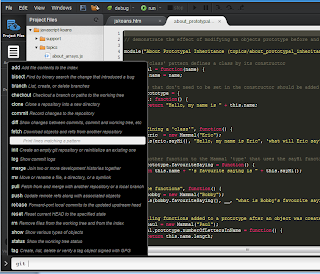
When you pair this repository with the Cloud9 IDE you can work on them completely on the cloud without having to download a single piece of code locally. Cloud9 (http://cloud9ide.com/) is an completely online and very richly featured IDE. One of the great things about Cloud 9 is that it can access your github repositories and clone them into its environment for you to edit. Cloud9 also provides you with a interactive console with git installed so you can push the changes back into your repository. The console will even give you intellisence on the git commands as shown to the right!
Assuming you already have a github account the first step is to fork a copy of the JavaScript Koans repository. Once you have a forked copy of the Koans head over to the Cloud9 website and log into your dashboard. Your dashboard will have a "Add On Services" section that will allow you to connect Cloud9 with your github account and pull in your public repositories. One thing I've noticed is that if you've added a new repository since you last connected with github you'll have to connect to github again for Cloud9 to pull in the newly created repository. Once the repository is pulled into Cloud9 next you'll have to select the project from the github menu and click on the "Clone to Edit" in order to be able to edit the files.
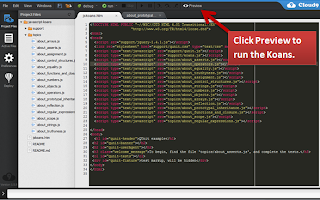
Once your github repository is cloned it will show up as a new project in the Projects area. First click on the Koans project and click on the "Start Editing" button which will open up the project in a new tab. Once your koans project is open double click on the "jskoans.htm" file to open it up in the editor. The editor will detect that this is a HTML file and a "preview" icon will appear in the editor. Click on this button to run the Koans. When you do the jskoans.htm file will open in a new tab and run the koans unit tests, which will fail on the first test like so:

Whats important to note here is which file the error occurred on. The Koans are organized by topics, and each topic will have its own JavaScript file with qUnit tests that pertain to that topic. Find that file that caused the error in the editor and open it. You'll now see all the qUnit tests for that file. Below you'll see the code from the first topic which is a brief overview of assertions.
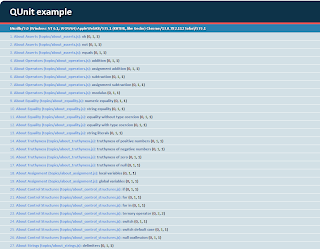
Inside the assertion code there will always be two underscores "__" that denote an area where you are to fill in a value to make the test pass. As you go through the exersizes save the unit test file and refresh the jskoans.htm preview page and you'll start to fill the page with passed tests. The test runner will stop at the first failed test it finds. As more and more of the tests pass the page will begin to fill up with passed tests as shown in the image to the right.
Whats great about the koans is that its an open source project so community members can add more tests and actively improve the tests that are there, which are very good right now. Some of the topics covered are: arrays, reflection, prototypical inheritance, objects, and functions and closures. Going through these you'll get to learn JavaScript the best way, by writing JavaScript.
When you pair this repository with the Cloud9 IDE you can work on them completely on the cloud without having to download a single piece of code locally. Cloud9 (http://cloud9ide.com/) is an completely online and very richly featured IDE. One of the great things about Cloud 9 is that it can access your github repositories and clone them into its environment for you to edit. Cloud9 also provides you with a interactive console with git installed so you can push the changes back into your repository. The console will even give you intellisence on the git commands as shown to the right!Assuming you already have a github account the first step is to fork a copy of the JavaScript Koans repository. Once you have a forked copy of the Koans head over to the Cloud9 website and log into your dashboard. Your dashboard will have a "Add On Services" section that will allow you to connect Cloud9 with your github account and pull in your public repositories. One thing I've noticed is that if you've added a new repository since you last connected with github you'll have to connect to github again for Cloud9 to pull in the newly created repository. Once the repository is pulled into Cloud9 next you'll have to select the project from the github menu and click on the "Clone to Edit" in order to be able to edit the files.
Once your github repository is cloned it will show up as a new project in the Projects area. First click on the Koans project and click on the "Start Editing" button which will open up the project in a new tab. Once your koans project is open double click on the "jskoans.htm" file to open it up in the editor. The editor will detect that this is a HTML file and a "preview" icon will appear in the editor. Click on this button to run the Koans. When you do the jskoans.htm file will open in a new tab and run the koans unit tests, which will fail on the first test like so:Whats important to note here is which file the error occurred on. The Koans are organized by topics, and each topic will have its own JavaScript file with qUnit tests that pertain to that topic. Find that file that caused the error in the editor and open it. You'll now see all the qUnit tests for that file. Below you'll see the code from the first topic which is a brief overview of assertions.
Inside the assertion code there will always be two underscores "__" that denote an area where you are to fill in a value to make the test pass. As you go through the exersizes save the unit test file and refresh the jskoans.htm preview page and you'll start to fill the page with passed tests. The test runner will stop at the first failed test it finds. As more and more of the tests pass the page will begin to fill up with passed tests as shown in the image to the right.Whats great about the koans is that its an open source project so community members can add more tests and actively improve the tests that are there, which are very good right now. Some of the topics covered are: arrays, reflection, prototypical inheritance, objects, and functions and closures. Going through these you'll get to learn JavaScript the best way, by writing JavaScript.
Labels:
JavaScript,
Koans,
Learning
Subscribe to:
Posts (Atom)
